A complete explanation from first principles
Mathematical operations leave implementation choices open
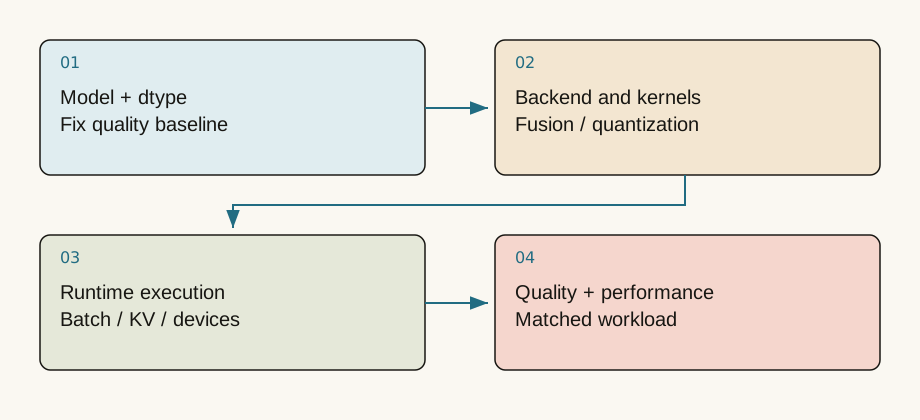
The same matrix multiplication can use different precision, tiling, layouts and kernels. Model code describes what to compute; an inference system chooses how to execute it on specific hardware. TensorRT-LLM is best studied through that layer of kernel selection, fusion, quantization, caching and scheduling rather than a single export command.
Workflows vary by version and backend. Do not assume every supported use requires manually building the same kind of engine. Verify the backend, model architecture, device and precision combination, and record versions.
Quantization uses a ruler with fewer marks
A simple symmetric quantizer computes q=clip(round(x/s),q_min,q_max) and reconstructs approximately s*q. Scale s determines spacing. Wide spacing loses detail; narrow spacing can clip large values.
With a deliberately simplified integer range [-7,7] and s=0.2, value 0.31 becomes integer two and reconstructs as 0.4, an error of 0.09. Actual formats and kernels have their own representation conventions.
values = [0.31,-0.62,1.4]
scale = 0.2
q = [max(-7,min(7,round(x/scale))) for x in values]
restored = [scale*x for x in q]
print(q, restored)
print('MSE:',sum((a-b)**2 for a,b in zip(values,restored))/len(values))
Quantize the component that matters
Weight-only quantization primarily reduces weight storage and traffic. Activation quantization changes intermediate formats; KV quantization targets context-dependent cache storage. Smaller weights do not automatically imply a smaller KV cache or low-precision execution everywhere.
Scales may be tensor-wide, per channel or per group. Finer granularity can reduce error while adding metadata and processing. Activation outliers complicate scale selection. Calibration examples should represent real languages, lengths and tasks rather than a few convenient short prompts.
Fewer bytes do not guarantee proportional speed
Compression can help a weight-bandwidth bottleneck. It helps less when communication, queues or unmodified operations dominate. Quantization and dequantization have costs, and efficient matching hardware kernels matter.
If an operation occupies 60% of runtime and becomes twice as fast, total normalized time becomes 0.4+0.6/2=0.7, a speedup near 1.43 rather than two. This Amdahl-style calculation is a starting point; bottlenecks can move after optimization.
Validate quality across meaningful slices
Retain an unquantized baseline. Compare fixed-input scores or task metrics, then inspect long contexts, rare terms, numbers, code and language slices. Matching one generated answer is weak evidence, and similar average accuracy can hide a concentrated regression. Define acceptable quality changes before deciding whether memory and speed gains are worthwhile.
Separate initialization, warmup and steady-state timing. Record lengths, batch sizes, parallelism and precision combinations. Performance in one optimized shape range does not establish performance under arbitrary dynamic requests.
The quantization arithmetic above runs in the embedded notebook. Change scale and inspect reconstruction error. Hardware experiments should then hold a checkpoint fixed and compare supported precision configurations using both quality and latency. The browser CPU exercise does not claim to benchmark TensorRT-LLM; it prepares you to interpret the measurements a real deployment produces.
Map model operations to hardware
TensorRT-LLM provides NVIDIA-oriented inference components and high-level interfaces. Supported execution paths depend on release, backend and model; it should not be permanently equated with one offline-engine workflow. Read the current quickstart before choosing the high-level LLM API, serving command or a specific engine path.
Optimization includes kernel selection, fusion, quantization, cache management and batching. Fusing small operations can reduce launches and HBM round trips while increasing register pressure. Shape and hardware determine the outcome.
Fewer bytes do not guarantee unchanged quality
A symmetric per-tensor illustration is , reconstructed as . Real formats may use zero points, group scales, mixed precision and different activation strategies. Half a byte per INT4 weight is a payload lower bound; scales and packing add overhead.
import torch
x = torch.tensor([-1.2, -.2, .1, .8])
scale = x.abs().max() / 127
q = (x / scale).round().clamp(-127, 127).to(torch.int8)
x_hat = q.float() * scale
print('max error:', (x-x_hat).abs().max().item())
This illustrates quantization numerically; it is not a TensorRT-LLM implementation. Effective hardware kernels are essential, because dequantization and unfavorable shapes can consume bandwidth savings.
Build a fair comparison matrix
Fix model revision, prompt/output lengths, concurrency, generation policy and quality set. Compare BF16 with supported low-precision configurations. Check perplexity, task accuracy or preference first, then throughput, TTFT, ITL, memory and failures. A twofold improvement on one short prompt does not establish production gains.
Record execution path and preparation cost. Are conversion, engine preparation or initialization included in cold-start latency? Do dynamic shapes add overhead? If the application includes a vision encoder, measuring only the language decoder misses part of the system.
Check your understanding
Question: Does changing 16-bit weights to 4-bit make end-to-end latency one quarter as large?
Answer
No. Only part of the data volume changes. Computation, KV, activations, scheduling and communication remain; scales and dequantization add work. Quality constraints may retain higher precision in selected layers.Primary sources and further reading
Sources checked on 2026-09-10. Teaching examples are not production benchmarks; confirm APIs and model support against the linked version.