A complete explanation from first principles
An image begins as a numerical array
An RGB image has height, width and color channels. A 224×224 image is commonly passed as [B,3,224,224], although some libraries place channels last. Four dimensions do not identify their meanings; inspect the preprocessing interface. A correctly displayed image does not guarantee correct channel order, scaling or normalization inside the model.
Pixels often change from integers in 0–255 to floating point and then undergo checkpoint-specific normalization. Resize, crop and normalization belong to the model's interface and should not be borrowed arbitrarily from a different checkpoint.
Convert a grid into a token table
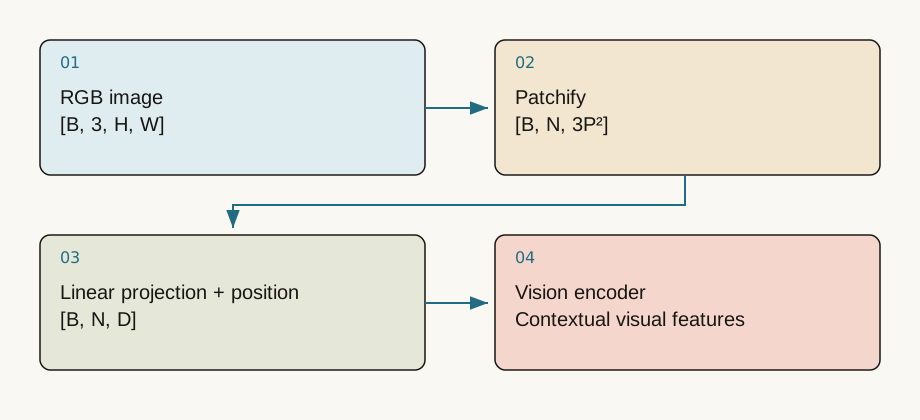
With patch side sixteen, a 224×224 image forms a 14×14 grid, or 196 patches. Each RGB patch contains 16*16*3=768 values. Flattening gives [196,768]; projection produces [196,d], or [B,196,d] with a batch axis.
Patch embedding can be implemented as an equivalent convolution rather than a literal Python slicing loop. The flattening order must remain consistent with learned weights. The notebook implements patchify and unpatchify and checks exact pixel reconstruction.
Smaller patches increase both detail and cost
At the same resolution, patch side eight produces 784 tokens rather than 196: four times as many. A subsequent dense attention score matrix can contain sixteen times as many elements. Smaller patches may preserve fine print and edges while increasing memory and computation.
Doubling both image dimensions also quadruples area. Moving from 224 to 448 does not merely double visual token count in a fixed-grid design. Dynamic-resolution models may use different mechanisms; this calculation describes a simple ViT grid.
Positions preserve the image's structure
Shuffling patches retains local colors and textures but disrupts object layout. Position representations identify where patches belong. A class token, when used, is a learned aggregation position rather than another physical patch from the image.
Adapting positional embeddings to a different grid can make shapes compatible without proving quality at the new scale. Training distribution and the target task still matter.
Preprocessing can remove the evidence
A center crop may erase a product label, receipt total or corner button. Before blaming model capacity, display the actual resized and cropped input. OCR can fail because text became too small rather than because the model lacks the relevant characters.
Extreme aspect ratios deserve particular care. Stretching distorts text, while cropping removes content. Padding, tiling and multiscale processing trade task coverage against visual-token budgets.
Start with the notebook's 8×8 grayscale image. Change patch size from two to four and observe token count fall from sixteen to four. That shape change is deterministic; quality changes require an actual task evaluation. The full multimodal notebook then inspects real CLIP and MAE preprocessing. Keeping the original image, actual model input, token count and task output together makes missing-evidence errors easier to identify.
Images are not pixel sentences
A vision encoder often divides an image into patches, flattens each and projects it into D features. For [B,3,H,W] and patch width P, divisible dimensions give tokens with raw features each. This is a learned linear transformation, not a discrete vocabulary lookup. Some models add CLS; others pool or compress differently.
A 224×224 image with 16×16 patches gives 196 patch tokens, or 197 including CLS. At 448×448, there are 784 patches and approximately sixteen times as many dense-attention pairs, not merely twice the cost.
Runnable patchification
import torch
image = torch.arange(3*32*32).reshape(1,3,32,32).float()
p = 8
patches = image.unfold(2,p,p).unfold(3,p,p)
patches = patches.permute(0,2,3,1,4,5).reshape(1,16,3*p*p)
projection = torch.nn.Linear(3*p*p, 64)
print(projection(patches).shape)  # [1,16,64]
Permutation order determines pixel layout and must match unpatchification. Correct shapes alone do not establish correct channels or positions. The notebook verifies round-trip patchification against the original tensor.
Preprocessing belongs to the model
Resizing, cropping, RGB conversion and normalization affect outputs. Passing already-rescaled float pixels into a processor that rescales by default can divide twice. Cropping a long image to a square may remove edge text before the encoder sees it. Inspect the processed image before blaming the generator.
Dynamic-resolution models can produce different visual-token counts for different aspect ratios; video introduces time as well. The fixed-ViT 196-token example does not apply universally.
Check your understanding
Question: Can patch width change from 16 to 8 while retaining the original patch-projection weights unchanged?
Answer
Usually not. Flattened patch size changes from 768 to 192, so weight shapes differ; positional representations and training distributions also change. Adaptation requires a defined method, not just a configuration edit.Primary sources and further reading
Sources checked on 2026-09-10. Teaching examples are not production benchmarks; confirm APIs and model support against the linked version.